One source of truth
Project context, risks, ratings, controls, actions and cost outcomes live in one project file. Update a risk and you can see what moves downstream. The picture stays current because it's all one picture.
CRAFT is browser-based software for preparing risk workshops, recording risks and actions, and risk adjusted cost modelling using Monte Carlo simulation.
For risk consultants, project-controls practitioners and estimators who need to explain risks and cost uncertainty.
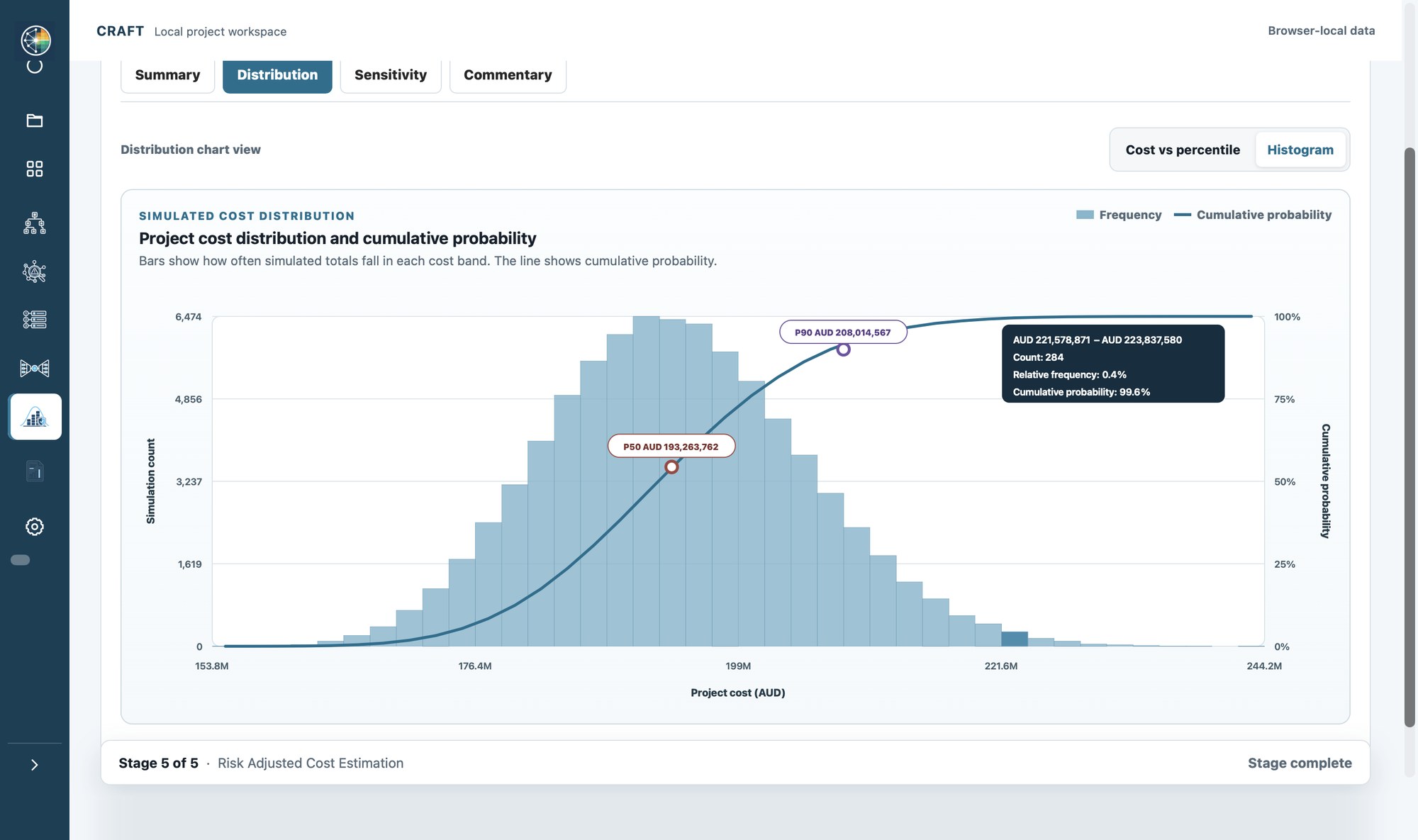
Distribution
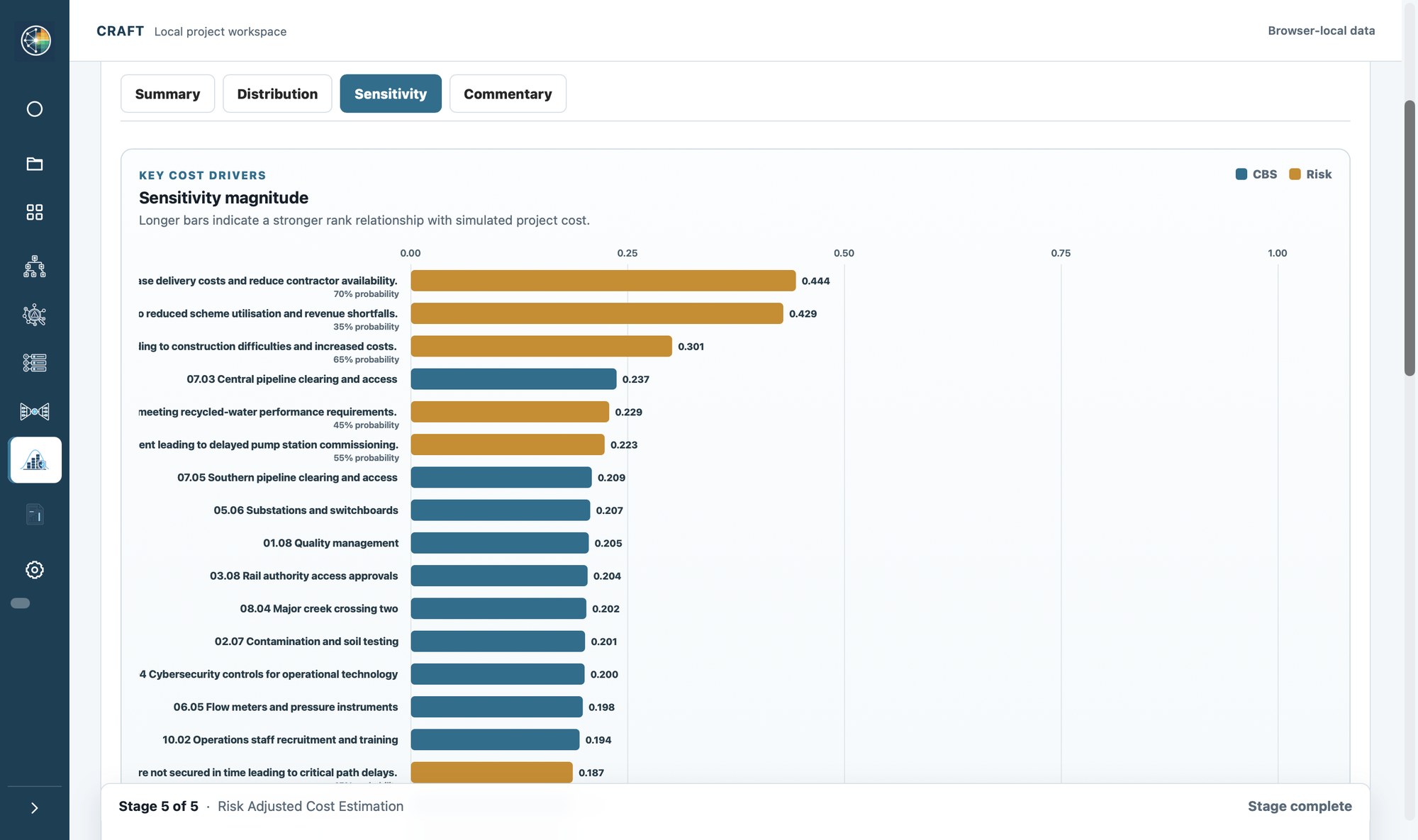
Sensitivity
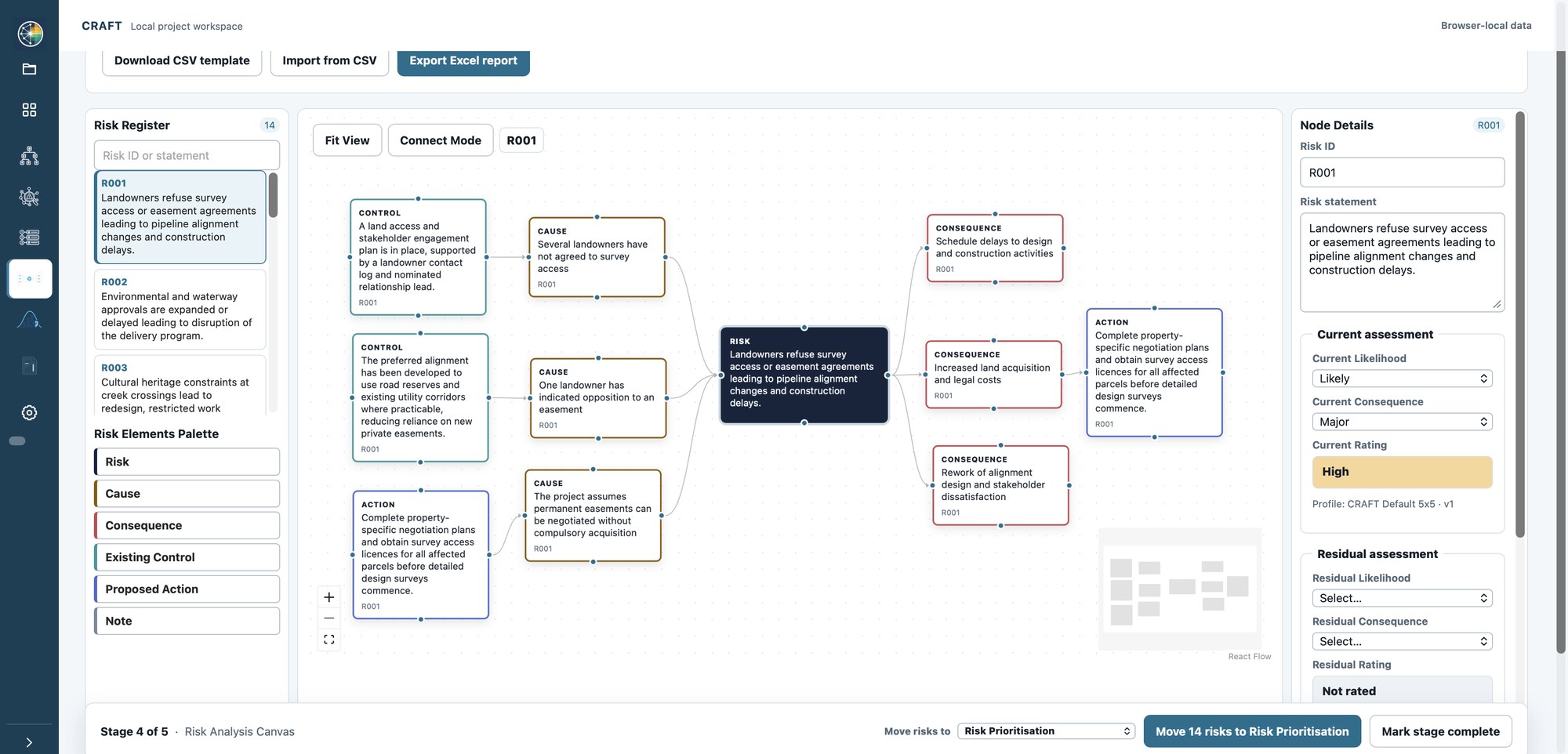
Analysis Canvas
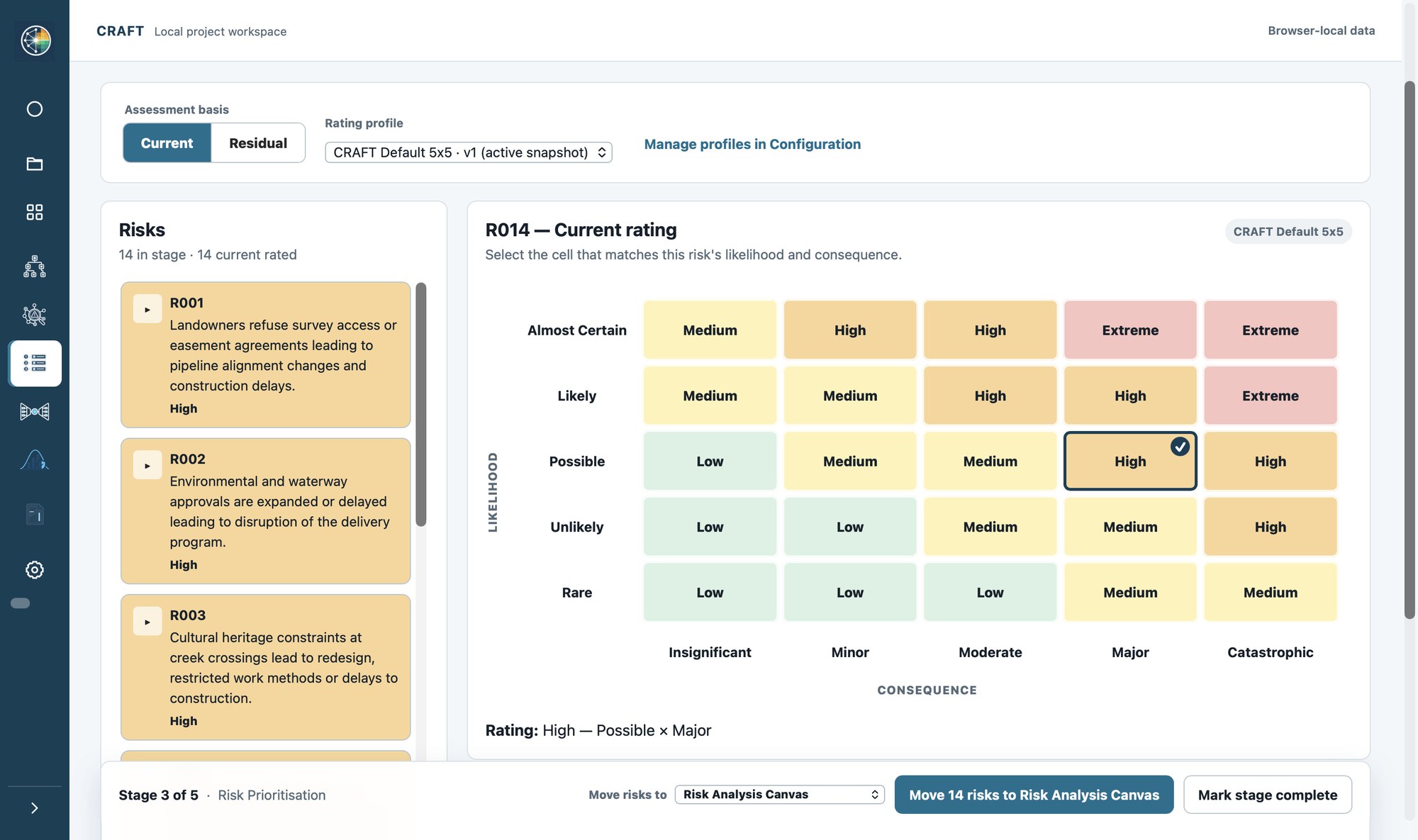
Prioritisation
Why it works
In CRAFT, the risk your team identifies is the same risk that gets rated, the same risk that's analysed on the Canvas, and the same risk that drives the cost model. Everything stays attached to everything else, so your analysis keeps its value long after the workshop ends.
Project context, risks, ratings, controls, actions and cost outcomes live in one project file. Update a risk and you can see what moves downstream. The picture stays current because it's all one picture.
Causes, consequences, controls and owners are agreed on screen while the team is still together. The workshop output is the record, so there's no writing it up from memory afterwards.
The contingency you present traces back through the ratings, the workshop discussion and the assumptions that produced it. When someone asks how you got there, the answer is in the same file.
Risk quality
The value of every register, review and simulation rests on one thing: how well each risk is written. CRAFT builds that quality in from the first entry.
Every risk in CRAFT is structured as cause, event and consequence, so each one is specific enough to own, price and act on. AI assists with the structure as you go, helping turn a rough description into a clearly separated cause, event and consequence that your team then refines and accepts:
Cause The switchgear supplier runs a single qualified fabrication line
Event HV switchgear delivery slips past the energisation window
Consequence Commissioning pushes into the next shutdown, carrying 11 weeks of standby cost
Written like this, a risk has an owner who knows what they own, a consequence you can put a number against, and a cause your team can treat. That's what turns a list of worries into a register that supports decisions.
And if your organisation runs a risk information repository, CRAFT is the perfect front end to it. Repositories are excellent at storing and reporting what you give them; CRAFT makes sure what you give them is clear, structured and worth keeping. The thinking happens in CRAFT, and the record lives wherever your governance says it should.
Better-written risks make everything downstream better: sharper workshops, cleaner priorities, a contingency you can stand behind.
Product
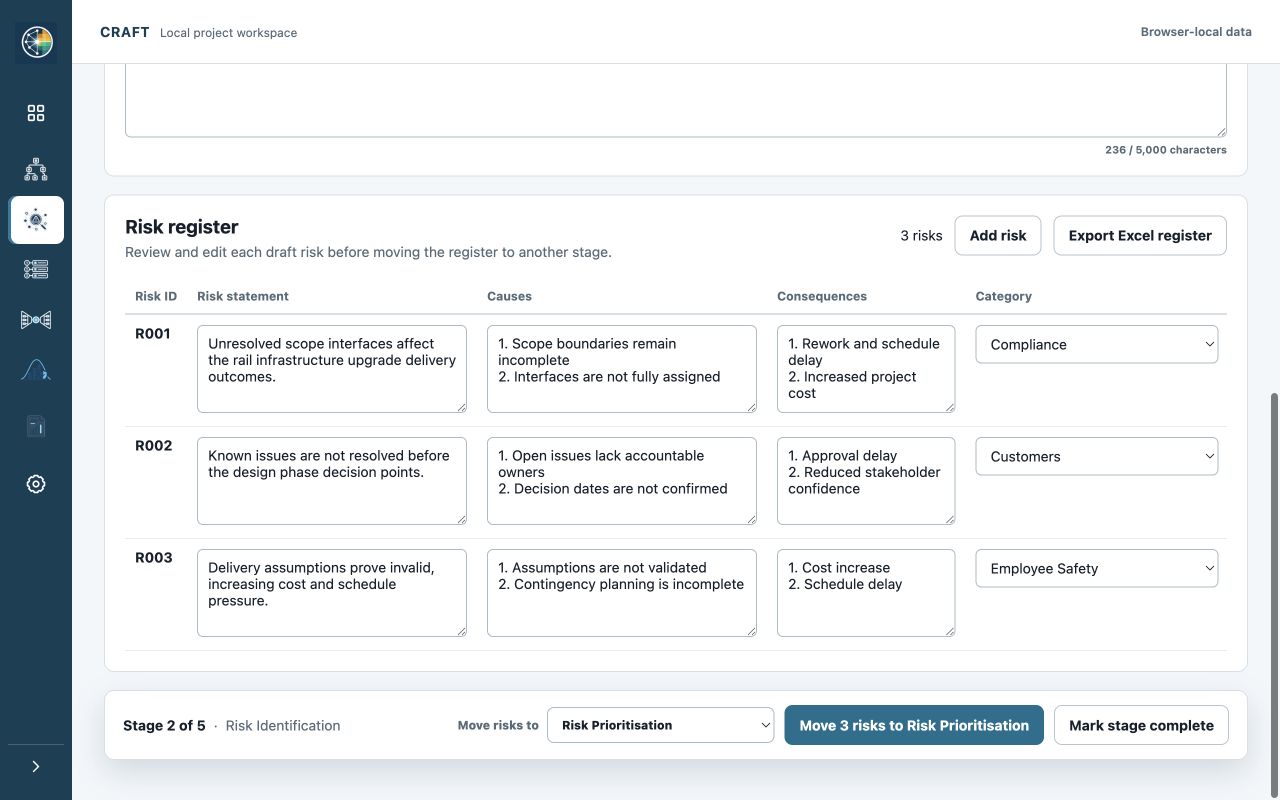
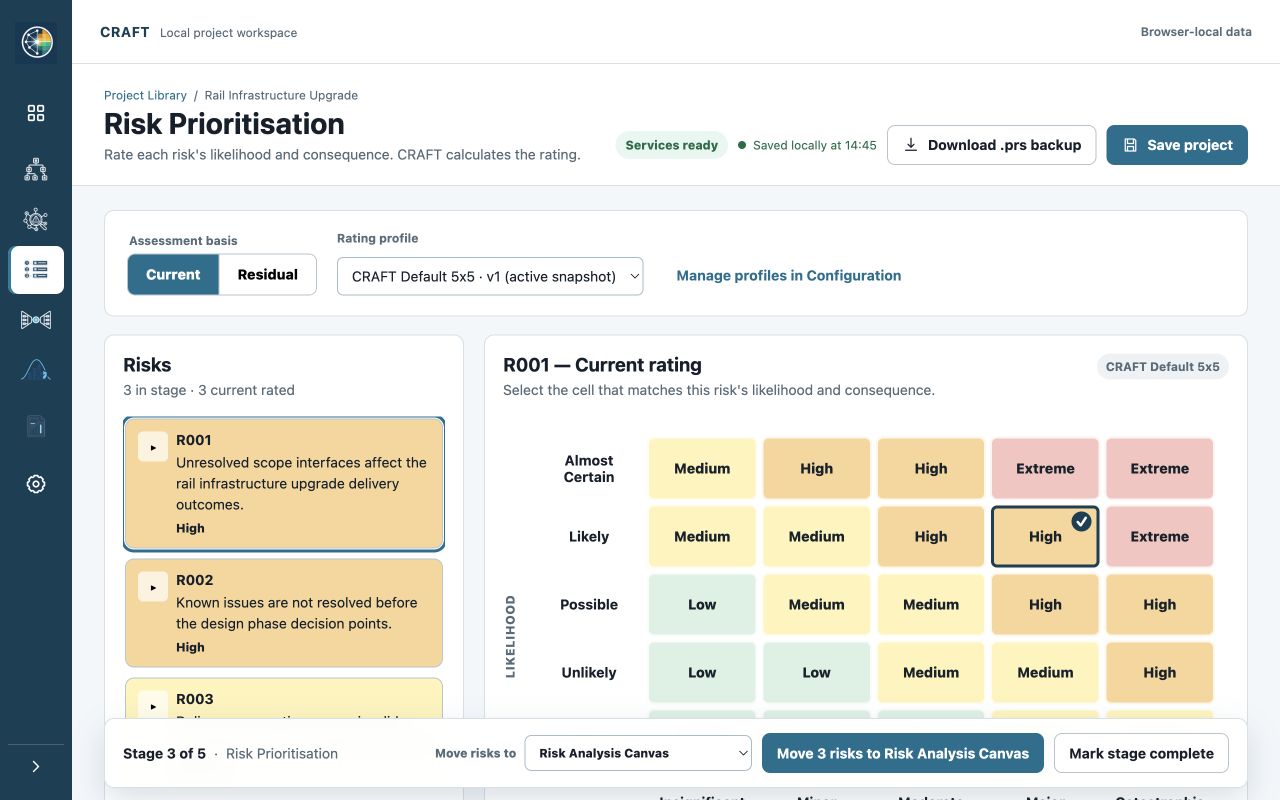
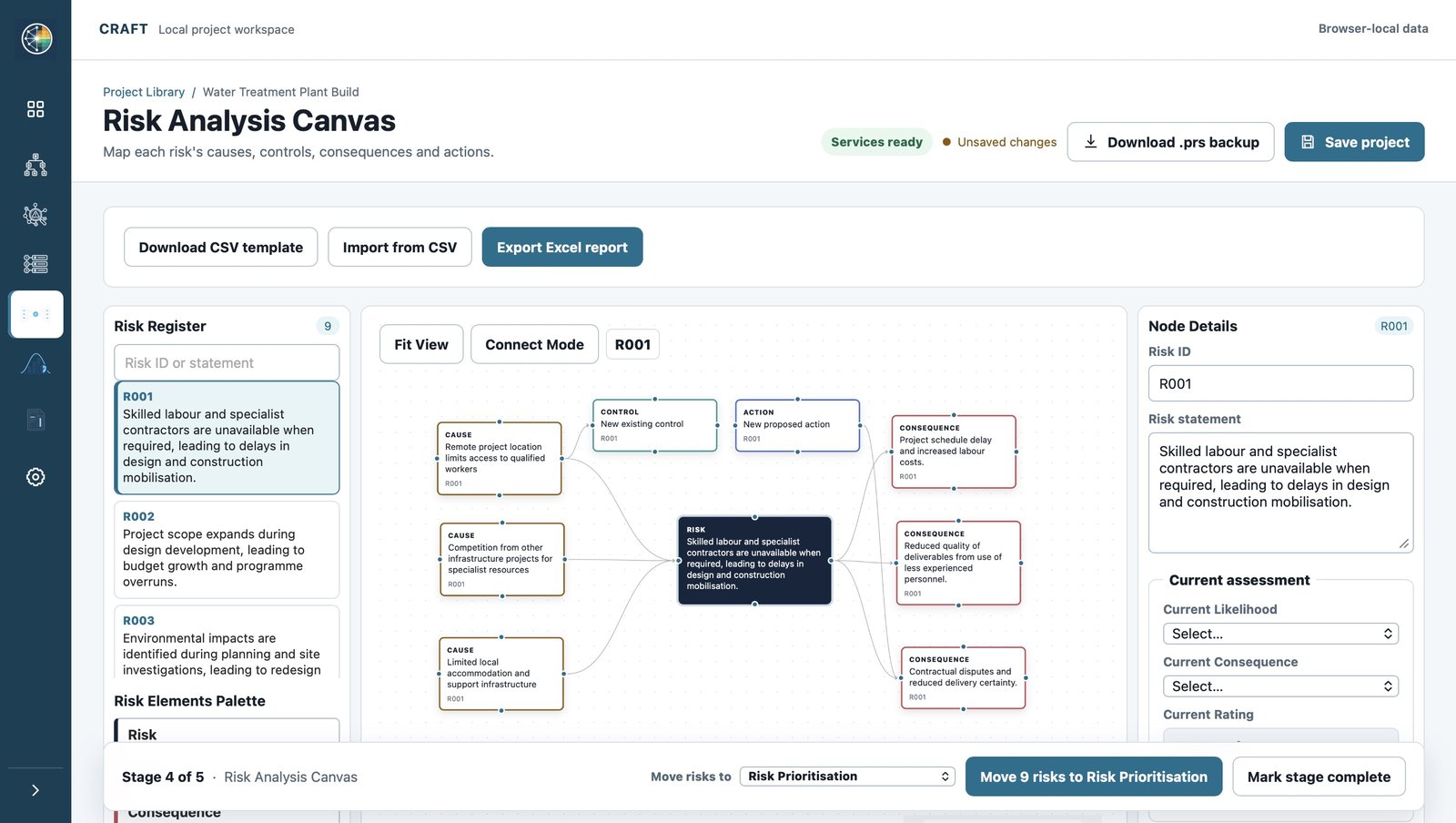
Project Overview sets the context, then five stages build on each other, working on the same project and the same risks all the way through. Reports and Configuration sit alongside them in the same product. Swipe or scroll the panel, or jump straight to a stage.
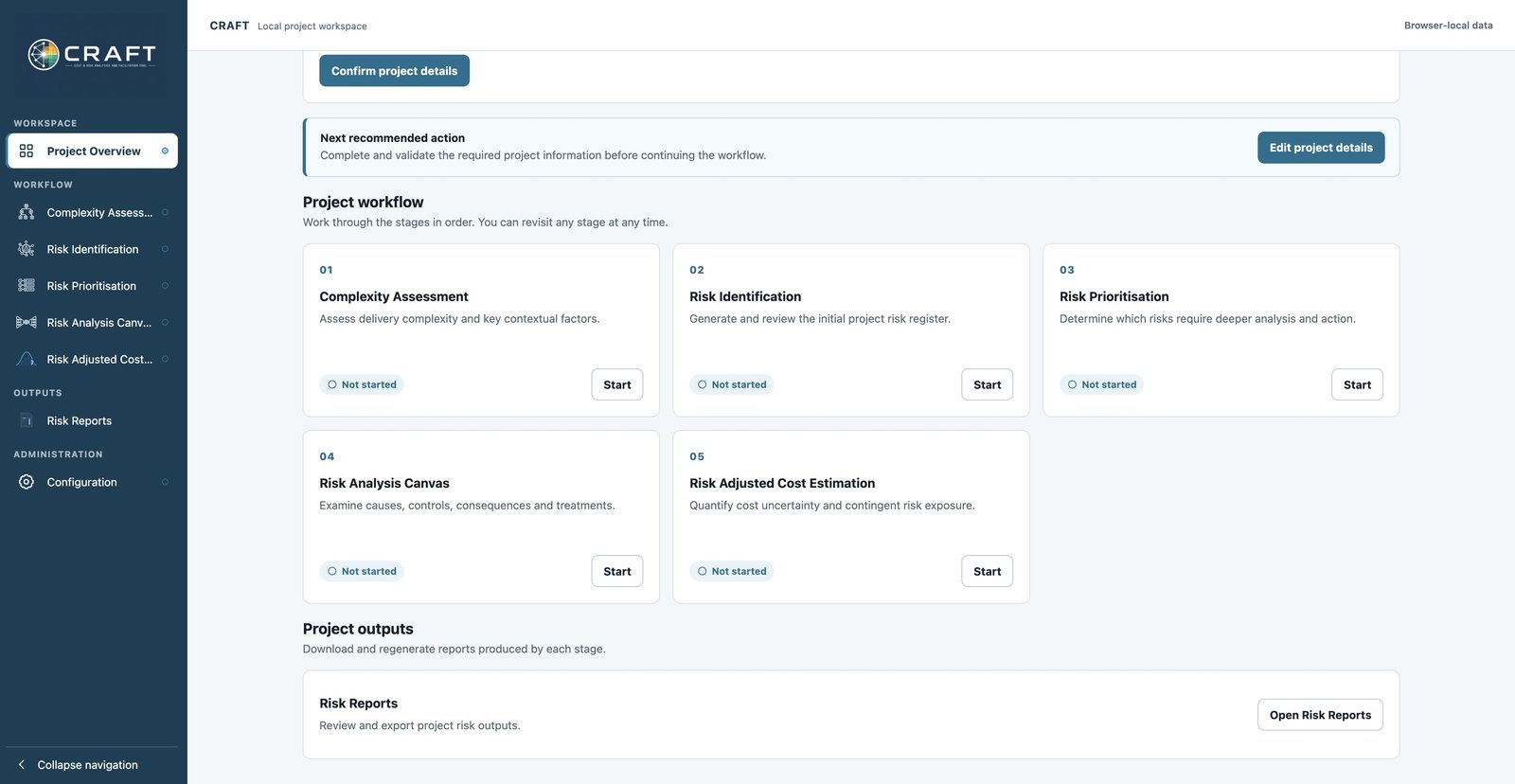
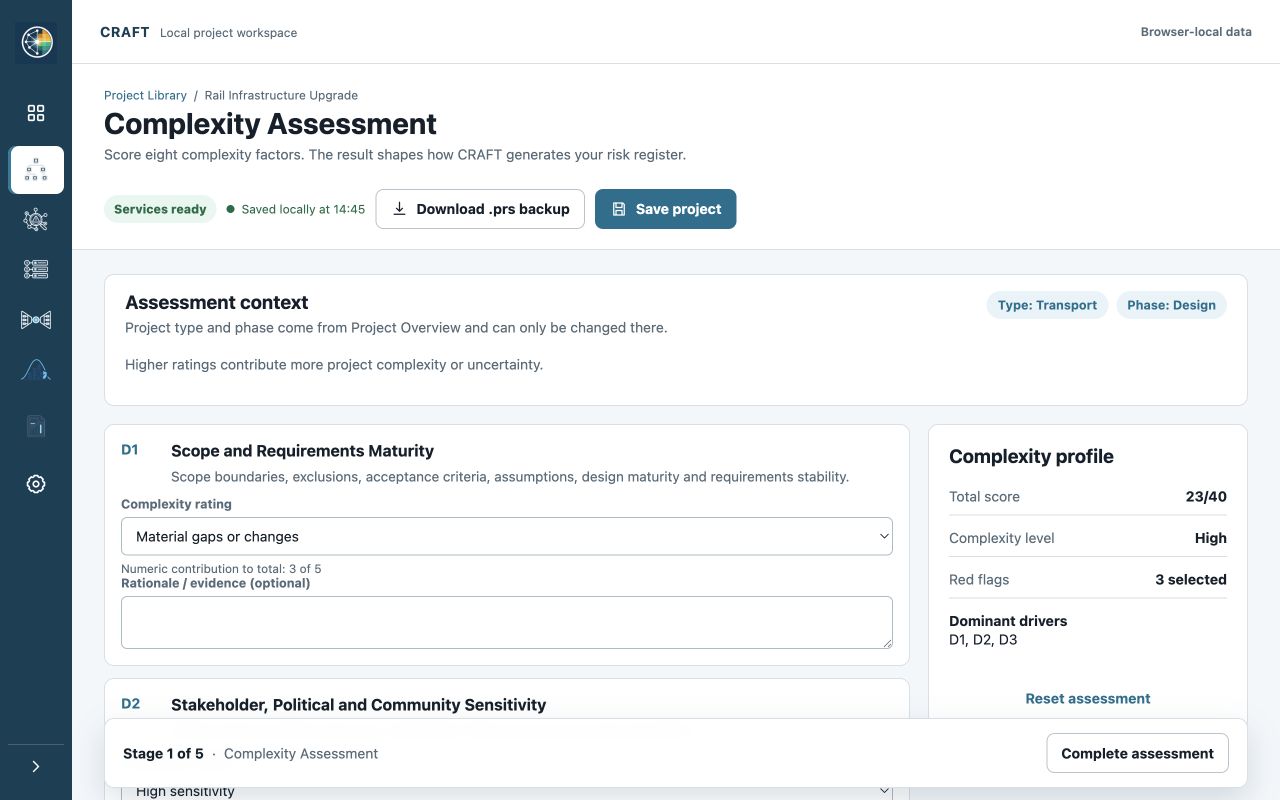
1
Set the objectives, scope and cost context, then score the complexity that should shape the conversation.
2
Draft the risk candidates, then work the room through causes, consequences, controls and actions on the Canvas.
3
Rate current and residual exposure against your matrix and agree where treatment is needed.
4
Model the uncertainty, read the distribution, and take away a contingency figure you can walk anyone through.
Sample output
Explore a fictional pump station project from risks and actions to cost results. Or open the 30-page sample output pack to see the detail in the exported reports.

Not a brochure figure, but the working detail: what your team would hold in the project file, what a reviewer would ask for, and where every number came from. Gaps are exported rather than hidden, so you can see how complete a register is.
Each section carries a marker: AI-assisted draft, facilitation surface, decided by the team or engine-calculated. A legend near the front explains each one, so nobody has to guess which parts a model touched. A closing page sets out plainly what CRAFT does not do.
Fictional project. The figures are internally consistent and reproducible, but they describe no real scheme and are not benchmarks.
Read-only document. No sign-up required.
How CRAFT uses AI
CRAFT puts AI on the slowest part of good risk work, turning discussion into structured, well-written analysis, and keeps every decision and every number firmly in your hands.
AI drafts
AI turns your project context into structured risk candidates using the categories you configured, so every draft starts from your project and your framework rather than a generic library.
Your team decides
Statements, causes, consequences, categories and ratings: your matrix, your people, your call. Nothing reaches the register until someone on your team agrees it belongs there.
The engine calculates
P50, P90, contingency and sensitivity come from a seeded Monte Carlo simulation over your inputs. CRAFT stores the seed with your project, so a rerun on the same inputs and engine version returns the same result.
AI never sets a risk ID, changes a rating or moves a number.
Facilitation
A good risk workshop captures the knowledge of everyone in the room. The Canvas gives the discussion somewhere to land.
Every cause, consequence and control becomes an object on screen the whole room can see, refine and agree on. Contributions from the quiet end of the table carry the same weight as everyone else's, ownership is settled while people are still together, and the session closes with a complete, agreed picture that exports straight into the pack.
Governance
Business cases, gateway reviews, assurance, audit, board papers. CRAFT gives you analysis that welcomes scrutiny, because everything in it can be opened up and explained.
Ratings, probability inputs, cost ranges, percentile outcomes and sensitivity drivers: every one of them can be inspected, challenged and explained.
Your work stays in your browser and saves to portable .prs files you control. There's no PRS server holding your project data.
Rating matrices from 3×3 to 6×6 and risk-category profiles you configure to match the framework your organisation already runs on.
Who it's for
Used across transport, utilities, energy, building, and information and technology projects: anywhere cost uncertainty has to be explained to somebody who wasn't in the workshop.
One connected project, a clearly written register, and a contingency figure that can be traced all the way back to the workshop. See the plans, or talk to us about how CRAFT fits the way your organisation already works.
If you're evaluating CRAFT for an organisation, a program or a portfolio, let's talk governance alignment, deployment and support before you commit to anything.
Enterprise enquiryMost AI registers are produced in one shot, with no project context and no control over categories, so you get forty generic rows to wade through. CRAFT works the other way round. Generation starts from your project context, is constrained to the categories you configured, and every candidate is a draft until your team edits and accepts it. You get the speed of a draft with the quality of a review, and what survives is yours.
A spreadsheet will happily let a risk exist with no owner, no costed mitigation and no connection to the estimate. CRAFT carries one canonical risk through prioritisation, the Canvas and the cost model, so the mitigation you agreed in the workshop is the one that shows up in the contingency. And every risk is structured as cause, event and consequence from the start.
No, it makes it better. Risk information repositories are excellent at storing and reporting what you give them. CRAFT is where the thinking happens: the workshop, the structure, the ratings, the quantification. It exports structured Excel outputs, so what lands in your repository is clear, complete and worth keeping.
CRAFT stores the random seed with your project, so with the same inputs, seed and engine version, a rerun reproduces the same percentile curve. You can show the inputs, the distribution, the sensitivity drivers and the assumption behind each one. That's the material a reviewer asks for, and it's all in the same file as the number.
There's no implementation project. Subscribe, create a project and start the same day. Configuring your rating matrix and risk categories takes about twenty minutes and you only do it once, because the profiles are reusable across every project. Most teams run their first real workshop within a week.
One person drives, the team works the same picture on screen. Causes and consequences go up on the Canvas, controls and actions get agreed and owned in the room, and ratings are applied against your matrix while everyone is still there. The session ends with the record already made.
CRAFT combines base-cost uncertainty and contingent risks in a Monte Carlo simulation. P50 and P90 are the cost values at the 50th and 90th percentiles of the simulated distribution. CRAFT reports contingency as the difference between P90 and P50: the additional allowance between the median simulated outcome and the high-confidence P90 outcome. The percentile curve shows cost against confidence across the simulated distribution, and sensitivity ranks the inputs with the strongest relationship to the result. CRAFT does not run a fixed number of iterations. It keeps sampling, through 5,000, 20,000, 80,000 and up to 320,000, until the contingency estimate is stable to the precision you asked for, and reports the precision it reached.
CRAFT stores the random seed with the project. With the same inputs, seed and simulation-engine version, a rerun produces the same result, supporting review and audit of the analysis.
Only if you want to. For each CBS item, choose one of CRAFT's estimate confidence profiles and CRAFT derives the best, most-likely and worst values from the base cost. Where you already know the range, choose User Defined and enter the three values directly. The resulting range stays visible and reviewable before you simulate.
CRAFT focuses on cost risk: base-estimate uncertainty, contingent risks and risk-adjusted contingency. Risks can record schedule-related consequences. Where you quantify the resulting financial exposure in a contingent risk's cost range, CRAFT includes that cost in the simulation. CRAFT does not run activity-duration or programme-network schedule simulation.
CRAFT runs in your browser and stores your project data locally on your own device. You can save and reopen projects as .prs files. Project data is not stored on PRS servers, which means PRS cannot access, recover or delete your projects for you. If your subscription ends, you will no longer be able to open or edit projects in CRAFT, but your .prs files remain on your device in a readable format.
When you use an AI-assisted feature, only the information needed for that request goes to the protected CRAFT service.
If your subscription ends, you will no longer be able to open or edit projects in CRAFT. Your .prs files remain on your device in a readable format. Because your projects live on your machine rather than ours, keeping your own backups of important work is your responsibility.
Not in this version; there's no live multi-user editing. In practice teams run one CRAFT session during a facilitated workshop and pass the .prs file between people under whatever version control they already use.
Portable .prs project files, plus Excel and JSON outputs from the project's current state: risk-register workbooks, Canvas workbooks, risk-adjusted cost results and a consolidated CRAFT workbook.
Yes, that's the point. Matrices from 3×3 to 6×6 and configurable risk-category profiles, so your team applies the method it already defends internally rather than learning ours.
CRAFT is designed for desktop use because it includes workbook-style inputs, local file handling and canvas workflows. Mobile and tablet browsers are not recommended for full project work at launch.
Paddle is the merchant of record for CRAFT Professional subscriptions. Paddle handles checkout, payment collection, invoices, payment-method updates and the billing portal. CRAFT receives only the subscription and fulfilment information needed to activate your account.
What you can do with CRAFT
Prepare
Set the project context, assess complexity and review AI-assisted risk drafts.
A structured risk register.
Give the team a starting point to review and refine.
Prioritise and act
Rate risks against your matrix. Map causes, controls and actions, and assign owners.
Prioritised risks and a visual action record.
Focus the discussion on the risks and responses that matter.
Model and explain
Run Monte Carlo simulations using your cost ranges and risk assumptions.
Cost percentiles, a histogram and sensitivity results.
Discuss contingency and where further investigation could help.
Will it fit your work?
Configure the risk matrix and categories to suit your organisation. Matrices range from 3×3 to 6×6.
Use a desktop browser. One facilitator can share the screen with the team. There is no simultaneous editing.
Projects are saved locally in your browser. Download .prs backups and export workbooks for review or sharing.
Model base-cost uncertainty and the cost of risk events. CRAFT does not simulate schedule networks or activity durations.
Open the sections you want to explore.
The public sample pack is a reference document. Approved evaluators receive a separate starter project and short guide with their access instructions.